Troubleshooting the Nissan Key Recognition Problem: What the Key Symbol on Your Dashboard Means
Understanding the Key Symbol on Your Dashboard
If you drive a Nissan, you may have noticed a small key symbol suddenly appear on your dashboard. It can be unsettling, especially if you are not sure what it means. This icon is part of the Nissan security system, and it usually indicates an issue with key detection. When the car shows this symbol, it is trying to tell you that the transponder key is not being recognized properly. This is what many owners call the Nissan key recognition problem. It is a common frustration, but it is also something you can often resolve without a trip to the dealership.
What Triggers the Key Symbol?
The key symbol is directly tied to the Nissan i-Key system and the Nissan R key fob. These systems use radio frequency identification to communicate with the vehicle. When you press the start button, the car sends out a signal to the key fob. If the fob does not reply correctly, the dashboard lights up the key symbol. The message is simple: the Nissan brand has built a robust security system, but it depends on a small piece of electronics working perfectly every time.
Common Causes You Can Check Yourself
Before you assume the worst, there are a few things that commonly cause this warning. Understanding them can save you time and money.
- Weak or dead key battery: The most frequent culprit is the battery inside the key fob. Over time, the battery loses charge. The range of the signal drops, and the car may not detect the key until you are very close. If the battery is completely dead, the system will show the key symbol and may not start the engine at all.
- Worn key or damaged transponder: Physical wear matters. A worn key can have a damaged transponder chip. Dropping the key fob or exposing it to moisture can also break the internal antenna. In this case, the key itself needs replacement.
- Interference or signal blockage: Sometimes the issue is not the key itself but the environment. Metal objects near the key or the receiver can block the signal. Keeping the key fob in a pocket with coins or a metal phone case can cause intermittent issues.
- Vehicle battery or alternator problems: A weak main battery or a failing alternator can cause voltage drops that confuse the security system. The car may not supply enough power to the receiver module, leading to a false key not detected warning.
How the Nissan Key Recognition Problem Affects Driving
When the Nissan key recognition problem occurs, the car may still start and run, but you might notice some quirks. The steering wheel lock may not disengage immediately, or the engine might take a second try to fire up. In more serious cases, the vehicle will refuse to start altogether. This is the security system doing its job - it will not let the car run if it cannot verify the key. That is a good thing for theft prevention, but it is a headache when you are in a hurry.
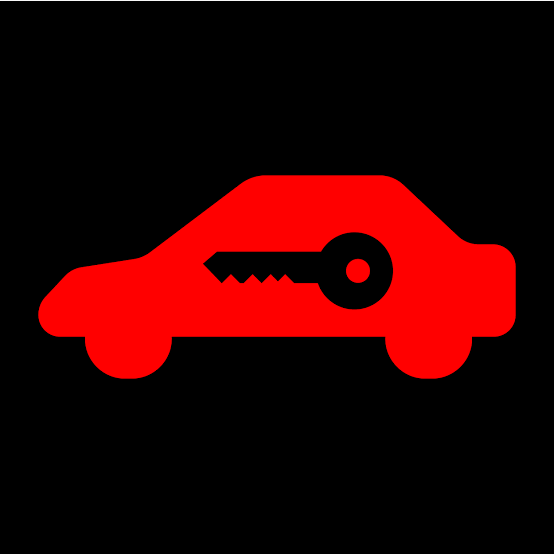
Many Nissan owners report that the key symbol appears after they have been driving for a while. That often points to the key battery getting weak. The initial start works because the battery has enough juice, but as the car vibrates and the temperature changes, the connection becomes unreliable. If you see the symbol while driving, it is not an emergency, but it is a sign you should address the problem soon.
Step-by-Step Troubleshooting
Here is a practical guide to diagnosing the issue yourself. These steps assume you have a basic understanding of your Nissan vehicles.
1. Check the Key Battery First
This is the easiest fix. Most Nissan key fobs use a small coin cell battery. You can buy a replacement at any electronics store or pharmacy. Open the fob carefully, note the battery orientation, and swap it out. After replacing the battery, try starting the car. If the key symbol goes away, you have solved the problem. If not, move to the next step.
2. Inspect the Physical Key and Fob
Look at the key itself. Is the plastic fob cracked? Are the buttons sticky or unresponsive? If you have a second key, try using it. If the second key works, your original key is likely worn out or damaged. In that case, you need a Nissan key replacement. You can get a new key programmed at a Nissan service center or a qualified locksmith that handles transponder keys.
3. Clean the Ignition Cylinder and Steering Wheel Lock
Dust and debris can accumulate inside the ignition cylinder. If the key symbol is accompanied by a stiff turning feeling, the cylinder may need cleaning. Use a small amount of compressed air or a specialized lock cleaner. Be careful not to use oil-based lubricants, as they can attract more dirt. Also check the steering wheel lock mechanism. If the steering wheel is locked tightly, it can confuse the system and trigger the warning.

4. Test the Vehicle Battery and Alternator
A simple voltage test can tell you if the car's electrical system is healthy. With the engine off, the battery should read around 12.6 volts. With the engine running, it should be around 14 volts, indicating the alternator is charging. If the numbers are low, the security system may malfunction. Addressing a weak battery or alternator can sometimes resolve the Nissan key recognition problem without touching the key at all.
When to Visit a Professional
If you have tried all the above and the key symbol persists, it is time to involve a Nissan service center. They have diagnostic tools that can read the exact error code from the security system. Sometimes the issue is a failing receiver module inside the car, or a lost programming link between the key and the vehicle. Reprogramming the key is a common fix. The Nissan i-Key system can lose its memory after a battery change if the key is not synced correctly. A service center can reprogram the key in a few minutes.
It is also worth noting that aftermarket key fobs sometimes cause the Nissan key recognition problem. If you have a non-OEM key, it may not communicate reliably with the vehicle. The Nissan brand uses a proprietary system, and third-party keys can be hit or miss. Sticking with genuine Nissan keys or having a reputable shop handle the programming is usually the safest route.
Preventive Tips to Avoid the Issue
Regular maintenance of your key fob can prevent most problems. Change the key battery every two years, even if it seems fine. Keep the fob away from water and extreme heat. If you have a spare key, rotate its use so the battery does not sit unused for years. Also, if you notice the key symbol flickering, do not ignore it. It is easier to replace a battery than to get stranded.
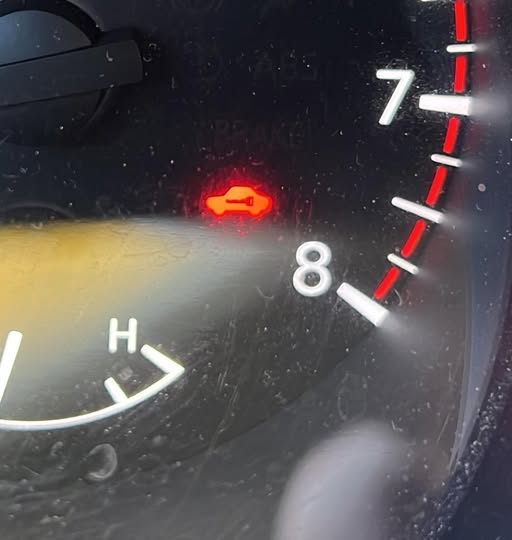
Another tip: when you park, make sure the steering wheel is not under tension. If you turn the wheel after switching off the engine, the steering wheel lock can engage in a way that confuses the security system. Straighten the wheel before turning off the car to avoid this.
Final Thoughts
Seeing the key symbol on your dashboard can be annoying, but it is rarely a catastrophic failure. In most cases, it is a simple battery change or a bit of cleaning that fixes it. The Nissan key recognition problem is well known among owners, and there is a lot of shared knowledge about how to handle it. By understanding what the key symbol means and following the steps above, you can often get back on the road quickly. If the problem persists, a professional can sort it out without too much trouble. The key is not to panic - the system is designed to protect your vehicle, and with a little attention, you can keep it working smoothly.